
Cum am ajutat un spital să rezolve problema afișajului manual al fluxului de pacienți și a personalului cu ajutorul semnalizării digitale interne
A hospital runs on information. Bed availability, shift schedules, lab results, emergency alerts — when all of that depends on paper pinned to a corkboard, things slip. Internal digital signage fixes this by putting the right information in front of the right people instantly. We saw this firsthand at a 320-bed public community hospital that had been running its internal communication without any internal digital signage for ten years. Here is what we did and what changed when we deployed internal digital signage.
1. The Challenge: A Hospital Still Running on Paper
Every morning, someone printed the shift schedules, department announcements, and patient flow updates. Then someone else walked them to 12 nursing stations, 4 waiting areas, and 2 break rooms. If you weren't standing in front of the right bulletin board at the right time, you missed it.
The worst part was patient flow. When a bed opened in the ICU, the ER had no way of knowing until someone picked up the phone and called around. The lab flagged a critical result — the nurse found out by pager or by walking over to check. Shift handovers used printed sheets that were often stale before the meeting started. The facilities manager told us: dddhhhWe spent more time managing paper than managing patients.dddhhh
The hospital knew it needed to change. They just did not know where to start.
2. The Solution: Internal Digital Signage Across Key Zones
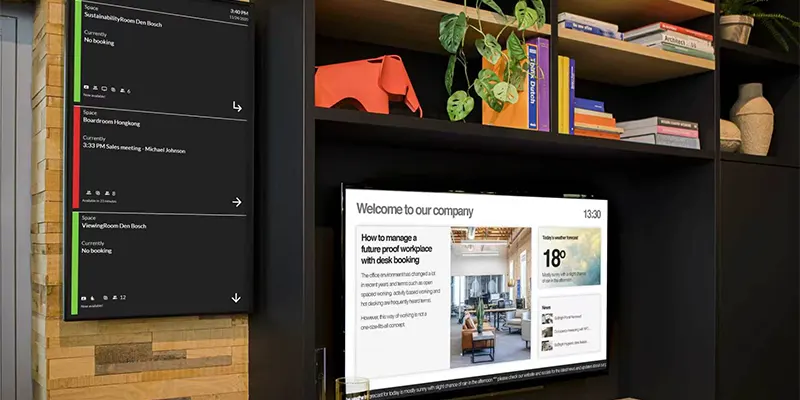
We split the internal digital signage deployment into three zones, each with a different purpose:
Clinical zones — nursing stations and nurse manager offices. 32-inch screens showed live bed availability, patient transfer notifications, critical lab results, and shift schedules. This zone updated automatically from the bed management system.
Public zones — waiting areas, lobby, cafeteria. 43-inch screens displayed estimated wait times, wayfinding, health tips, and general announcements. Content rotated every 15 seconds. Patients stopped asking the front desk for directions — they just looked up.
Staff zones — break rooms, staff corridors, meeting rooms. 24-inch screens handled HR bulletins, training schedules, shift swap boards, and emergency alerts. Staff started checking the screens the way they checked their phones.
Everything ran on a cloud based platform. Staff pushed updates from any computer on the network. The internal digital signage used existing Wi-Fi with a dedicated VLAN. No new cabling, no construction, no downtime.
3. Implementation: Three Phases, Zero Disruption
The rollout happened in three phases so nothing interrupted patient care.
Phase 1 — Audit and readiness (weeks 1–2). We walked every floor, mapped every screen location, and talked to each department head about what they needed. We found 17 locations where printed paper was the only channel.
Phase 2 — Pilot in ER and ICU (weeks 3–4). These two departments had the most urgent needs. We put in 6 screens, trained 15 nurses on the internal digital signage platform, and ran digital alongside paper for a week. The ER charge nurse said: dddhhhI stopped checking the bulletin board on day three. The screen told me everything.dddhhh
Phase 3 — Full rollout (weeks 5–8). We deployed the remaining screens, configured content templates per zone, and moved everything — shift schedules, HR memos, training calendars, emergency protocols — onto the internal digital signage platform. We kept paper boards as a safety net for the first month. By week 8, the signage had completely replaced them.
4. Results: What Changed in 90 Days
We checked in at 90 days and measured the impact:
Bed turnover time dropped 22%. The ER could see open beds in ICU and general wards instantly. Transfer decisions that used to take 15–20 minutes dropped to under 5. Less time on the phone, more time with patients.
Staff satisfaction with internal communication went from 37% to 81%. Before the rollout, only a third of staff felt well-informed. Three months in, four out of five did. The biggest shift was shift changes — no more missed schedule updates.
Emergency alerts hit every screen in under 10 seconds. With internal digital signage, code blue and security alerts pushed across every screen simultaneously. The old phone tree took up to 4 minutes.
Paper usage dropped 93%. The hospital was printing over 8,000 sheets per month before. After deployment, that went down to under 600. Saved roughly $5,300 per year in paper and toner alone.
5. Key Takeaways for Healthcare Facilities
Zone your content. Clinical staff need dense, accurate data. Patients need calm, clear information. Staff in break rooms need timeliness. A single approach for all three would have failed.
Run parallel at first. Keeping paper and digital side-by-side for the first month took the fear out of the transition. Staff switched to the screens because they were faster.
Get department heads on board early. We found champions in the ER and ICU first. When they told other departments the system worked, that carried more weight than any slide deck.
Assign a content owner. The hospital put one part-time coordinator on the internal digital signage platform. Without someone refreshing content daily, screens go dark. With a dedicated owner, the signage became the primary communication channel in two months.
Conclusion
The hospital went from bulletin boards to a full internal digital signage network in eight weeks. Faster patient transfers, better-informed staff, 93% less paper — all driven by the signage system. The screens themselves were simple. What took real work was tracing how information moves through a hospital and matching the displays to that flow.
If your hospital is still running on printed paper and word of mouth, internal digital signage is the answer. It saves time on transfers, keeps staff in the loop, and cuts emergency response lag. In a place where minutes matter, that adds up fast.
FAQ
1. How much does internal digital signage cost for a hospital?
Expect $25,000 to $50,000 for hardware and software licensing at a mid-sized hospital (320 beds, roughly 40 screens). Most break even within 6–12 months from paper savings and recovered staff time.
2. Do you need new network infrastructure?
Usually not. Most hospitals already have Wi-Fi. A dedicated VLAN for signage traffic is recommended. A site survey is advisable, but existing infrastructure is typically sufficient.
3. Can digital signage connect to our existing hospital systems?
Yes, if your EHR, bed management, or nurse call systems expose APIs. In this deployment we integrated with the bed management module for live availability. Even without deep integration, the platform still works with manually updated content.
4. What happens if the Wi-Fi goes down?
Cloud-managed signage platforms cache content locally on each screen. Screens keep displaying the last known data until connectivity returns. We still recommend one paper board per department as a fallback during extended outages.
5. How long does staff training take?
Viewers need zero training — the screens just display information. Content managers need about two hours to learn scheduling, content rotation, and emergency alerts. The communications coordinator was running it independently after one afternoon with light support during the first week.